
CHANGES
See what changed at a glance
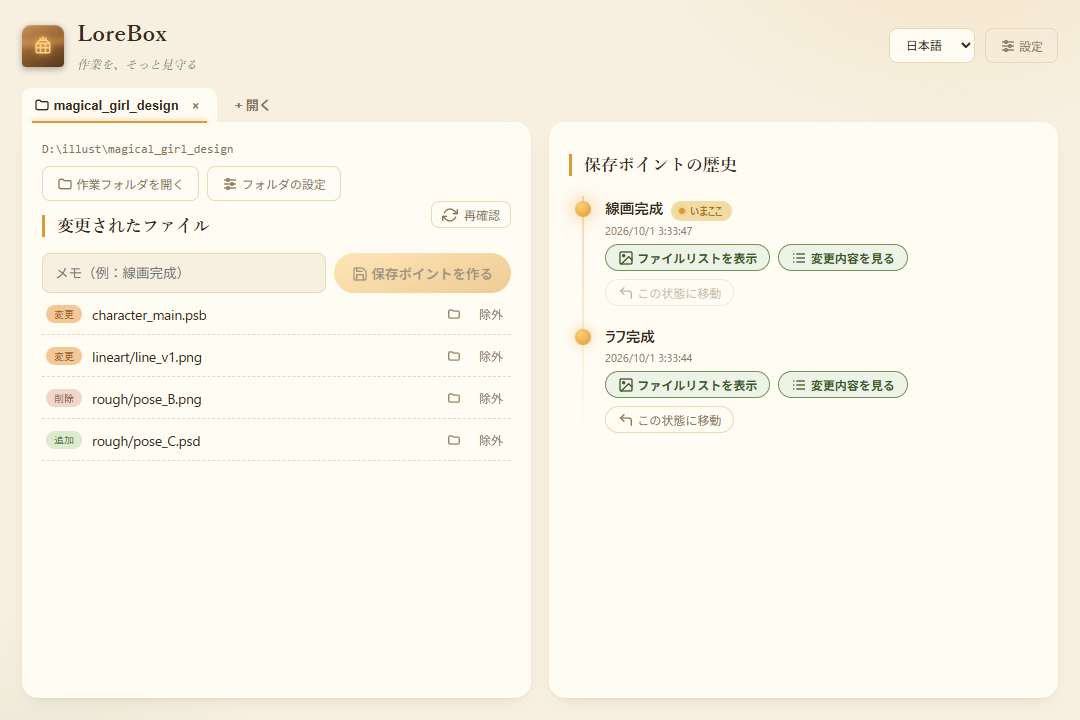
When you open a working folder, LoreBox automatically detects files that were added, changed, or deleted, so you can see right away which files you worked on.
LoreBox records and restores the change history of your creative files — just pick your working folder. A desktop app for Windows and Mac, free to start.
Latest version v0.2.2 (published October 30, 2026)
Windows 10 / 11 (64-bit)
After you extract the portable version, run LoreBox.exe directly. No installation needed.
If Windows SmartScreen shows a warning, click “More info” and then run the app.
Apple Silicon (M1 or later) only
Open the dmg and drag LoreBox into the Applications folder.
Note: Intel Macs are not supported at this time.
Signed plugins used for cloud backup and more. Install a downloaded file from “Install official plugin (ZIP)” under “Plugin settings” in the app’s settings.
Dropbox plugins are coming soon.
USD 19.99 (tax included) / early-purchase price
Buy now (Stripe checkout)A one-time purchase. One license can be registered on up to 3 devices. It unlocks managing several folders in tabs, automatic save points, keeping the app in the taskbar, and plugins (including cloud backup).
Within 14 days of purchase, you can request a full refund from the app settings, for any reason.
After payment, the license key is sent to the email address you used to buy. Enter it under “License” in the app settings.
The currency and amount shown on the checkout page apply. See the Seller Information and the Terms of Service. For questions, use the contact form.
From checking changes to recording and looking back, LoreBox follows the flow of your work. The screenshots show the Japanese UI; LoreBox also has an English UI.
When you open a working folder, LoreBox automatically detects files that were added, changed, or deleted, so you can see right away which files you worked on.
Create a save point with a note such as “rough draft done” or “before coloring”. Your progress is recorded in a form that is easy to look back on later.

Return to the state of any past save point at any time. The state from before the restore is saved too, so you can rest easy.

Download, extract, and pick your working folder. That's all.
On Windows, choose the portable or the setup version. On macOS, choose the Apple Silicon zip.
Extract the whole LoreBox folder of the Windows portable version. For the setup version, run the setup inside. On a Mac, open LoreBox.app.
Choose the folder that holds your artwork, and history tracking starts right away. See the manual for how to use it.
Built on Lore by Epic Games (MIT), LoreBox manages the history and backups of your creative files.
The free version manages one working folder at a time. Automatic save points, keeping the app in the taskbar are also paid features, available with a license.
v0.2.2 (published October 30, 2026)
The main changes and download files of past versions. You can download them from this site.